 ▶
▶
 ▶
▶Life Admin & Important Documents Command Center
The documents aren't lost. The map is.
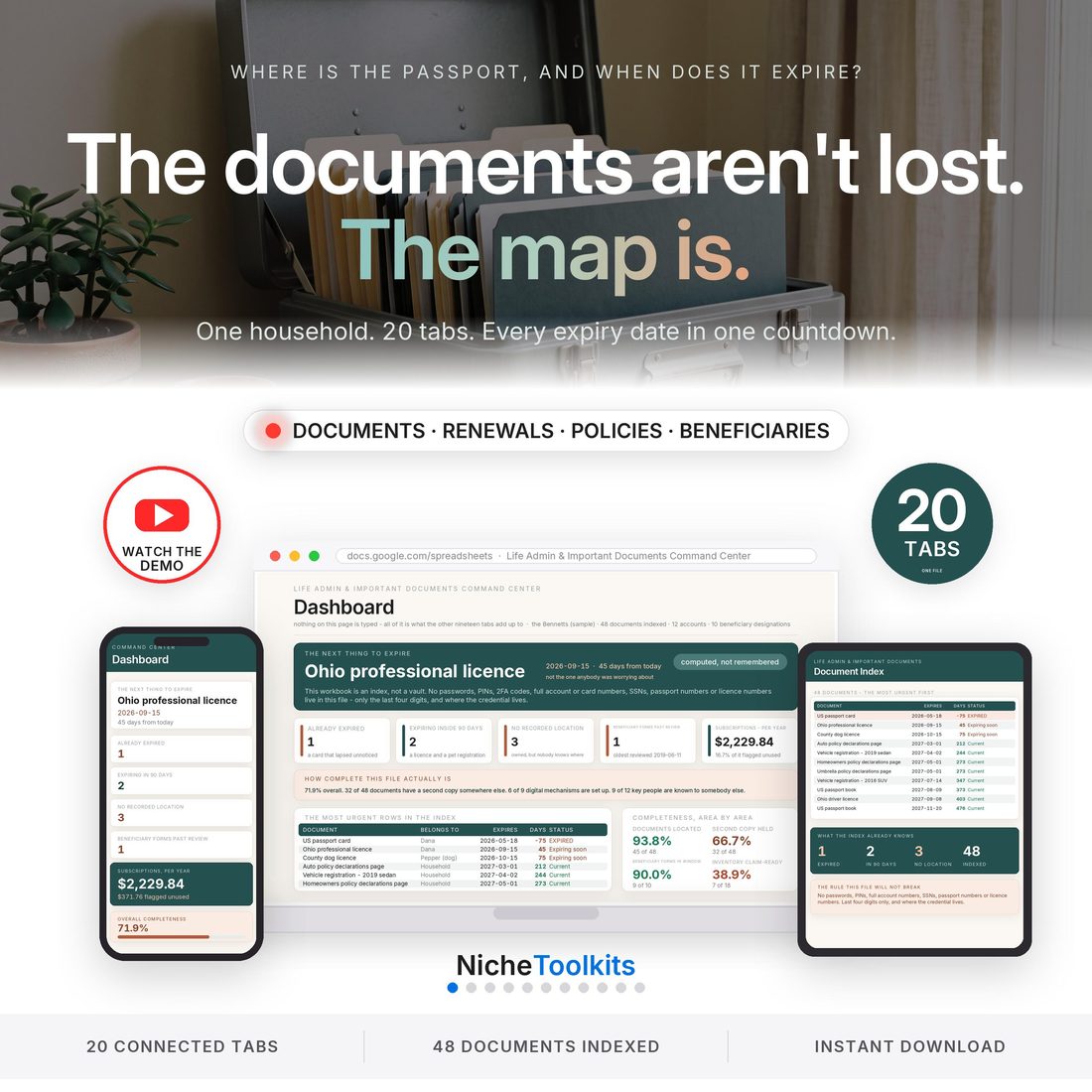
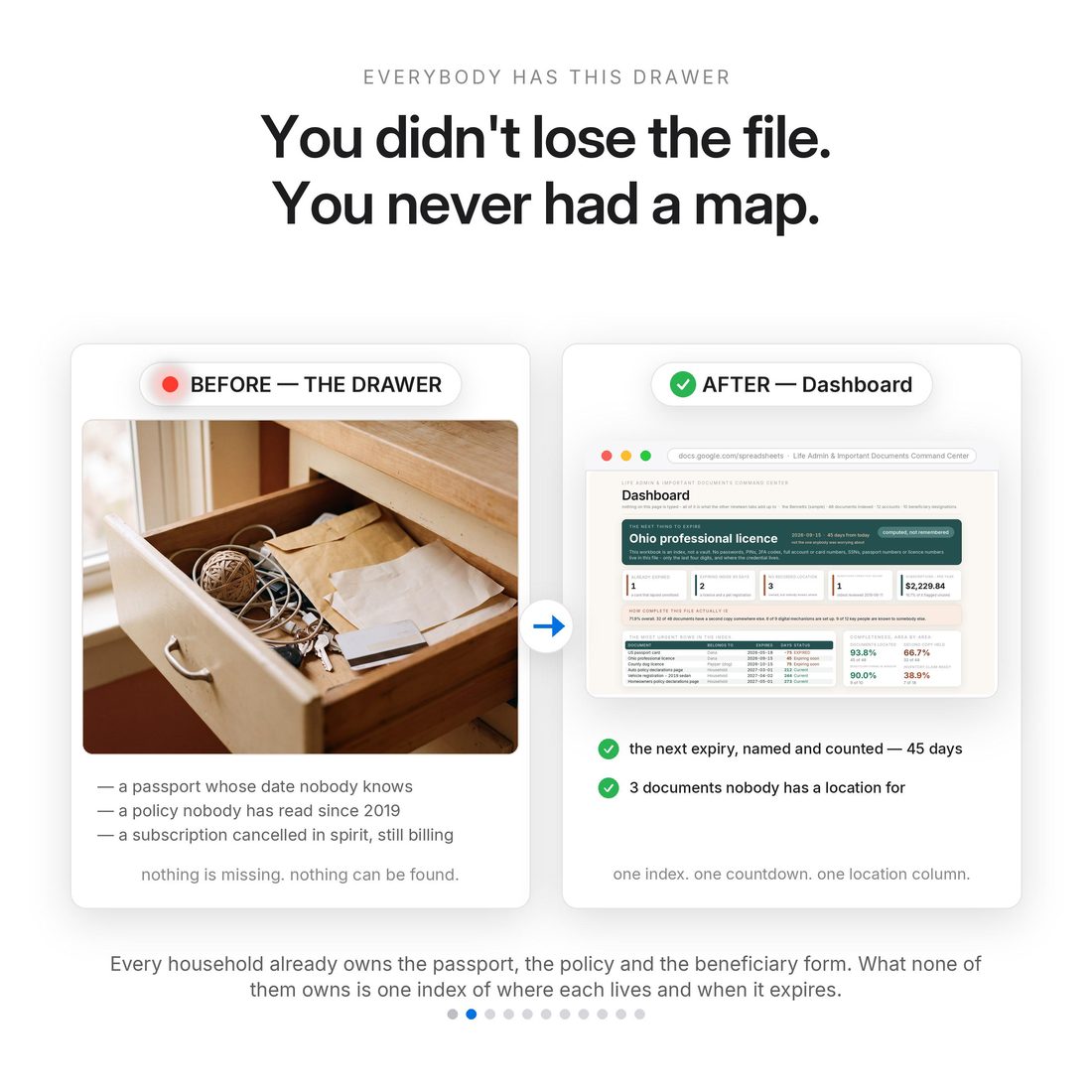
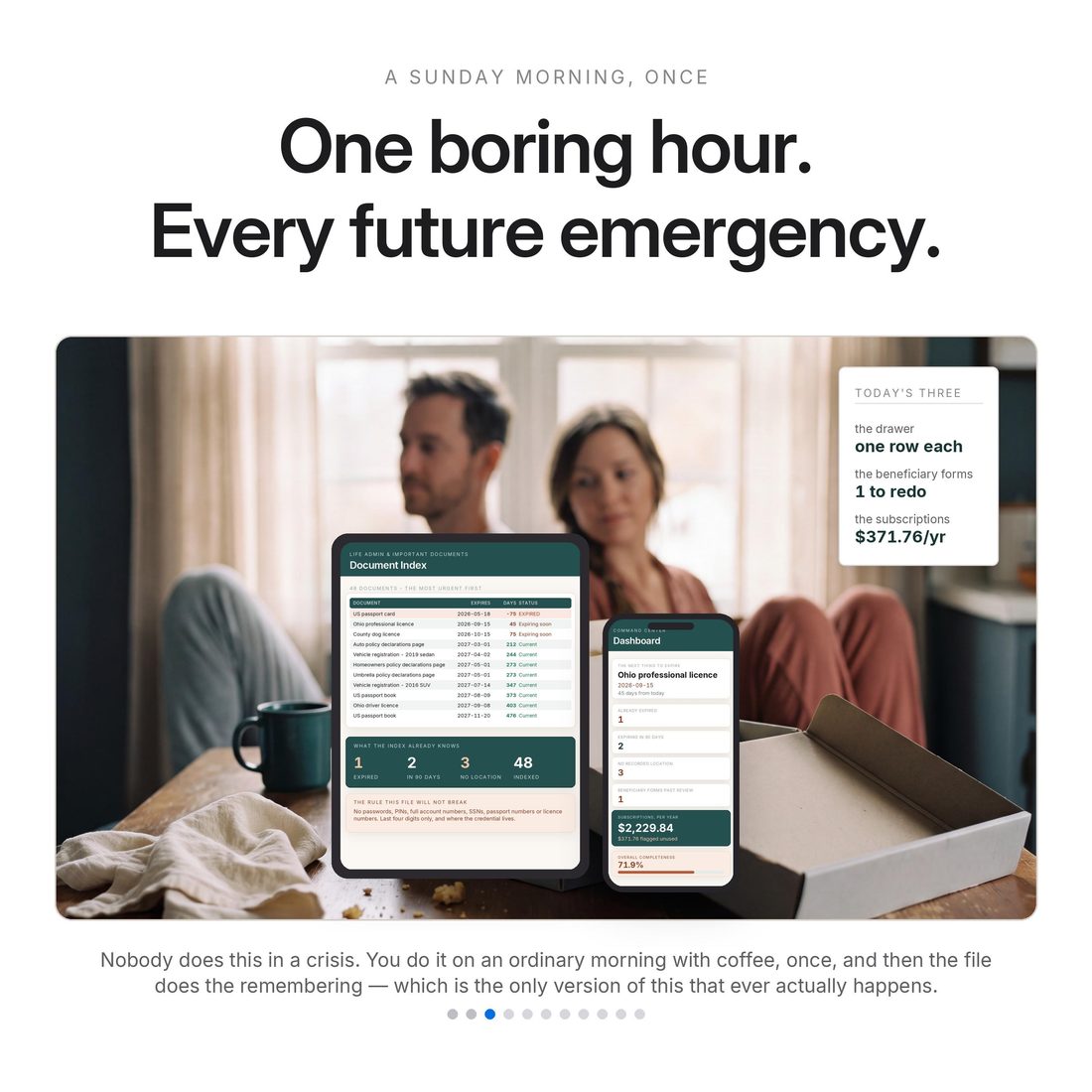
You already own the passport, the policy, the deed and the beneficiary form. What you probably do not own is one index of where each of them lives, when it expires, and who else could find it. That is why the failure is never that the household did not have it — it is that nobody could find it, and nobody knew it had lapsed. This is that index: twenty connected tabs, one row per document, and a countdown that does the remembering for you. In the shipped sample the Bennetts index 48 documents in one Sunday morning, and the file immediately names one that has already expired, two more inside the 90-day window with the next 45 days out, three documents with no recorded location at all, a beneficiary designation last reviewed 85 months ago, and $2,229.84 a year still billing across 7 subscriptions. The overall completeness score is 71.9%, which is not a failure. It is a to-do list.
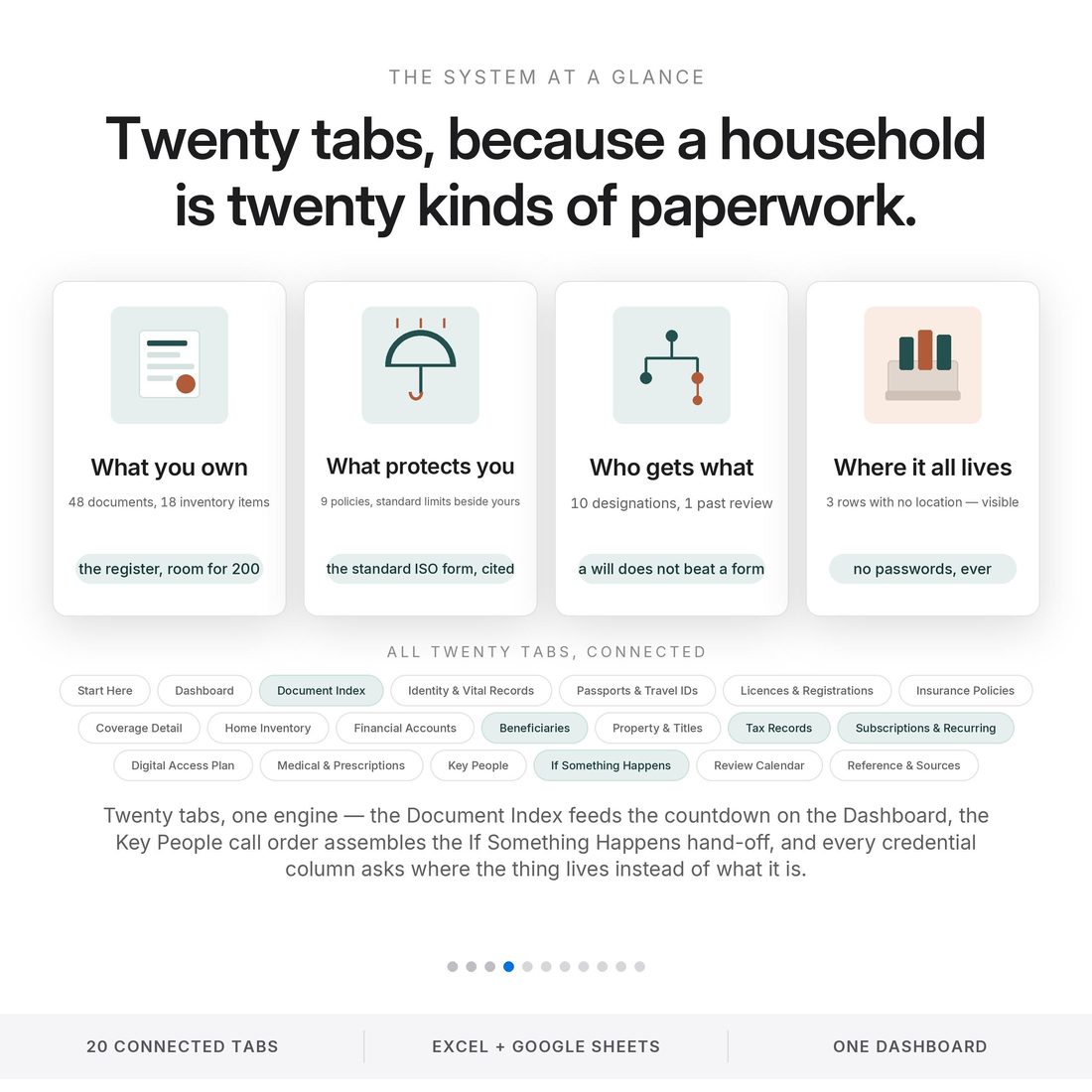
- Document Index — the master register: document, owner, both locations, dates, and a live countdown against today
- Expiry countdown — the sample opens on one document already expired, two more inside the 90-day window, and the next one 45 days out
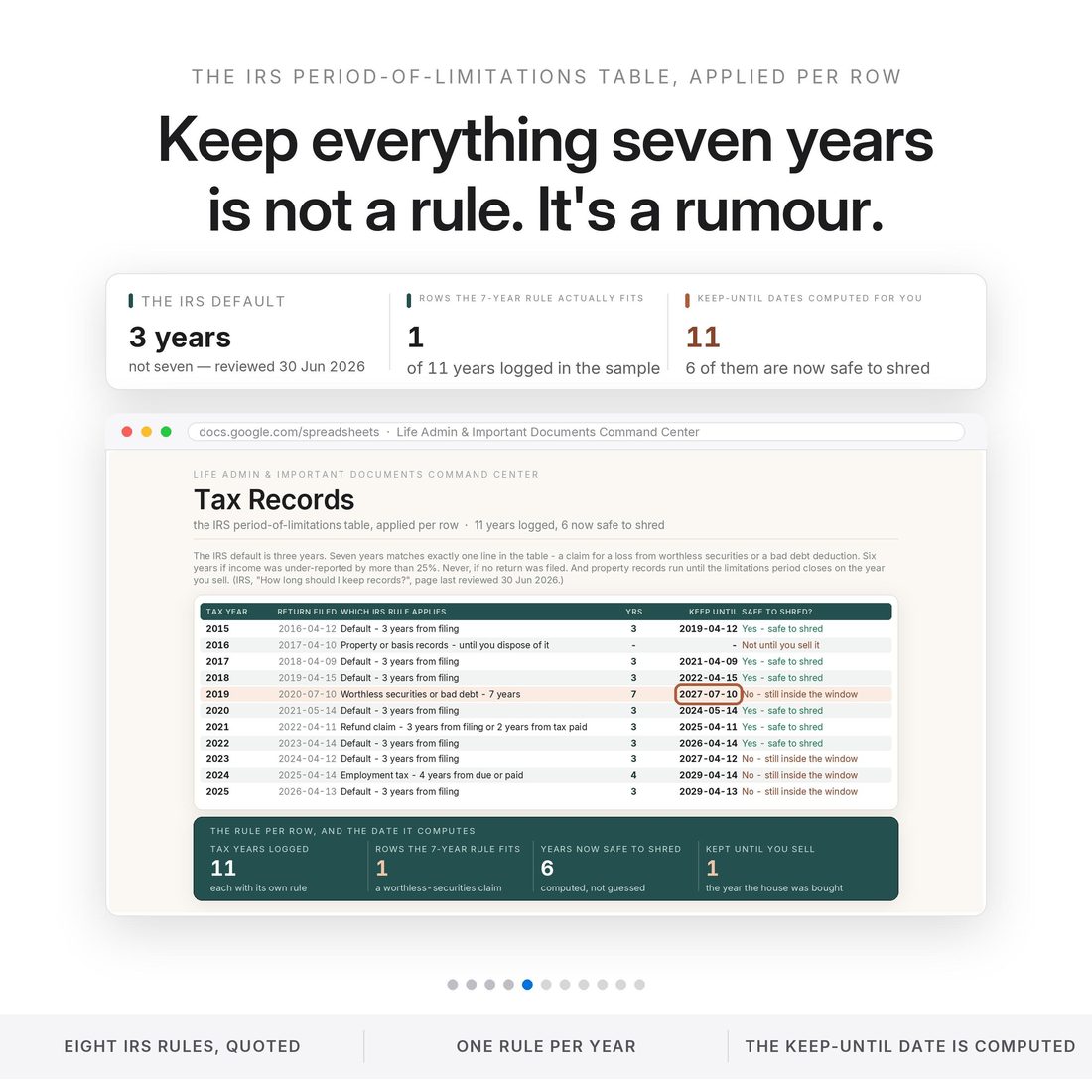
- Tax Records — the actual IRS period-of-limitations rule applied per year with the keep-until date computed; the default is three years, and seven fits exactly one line
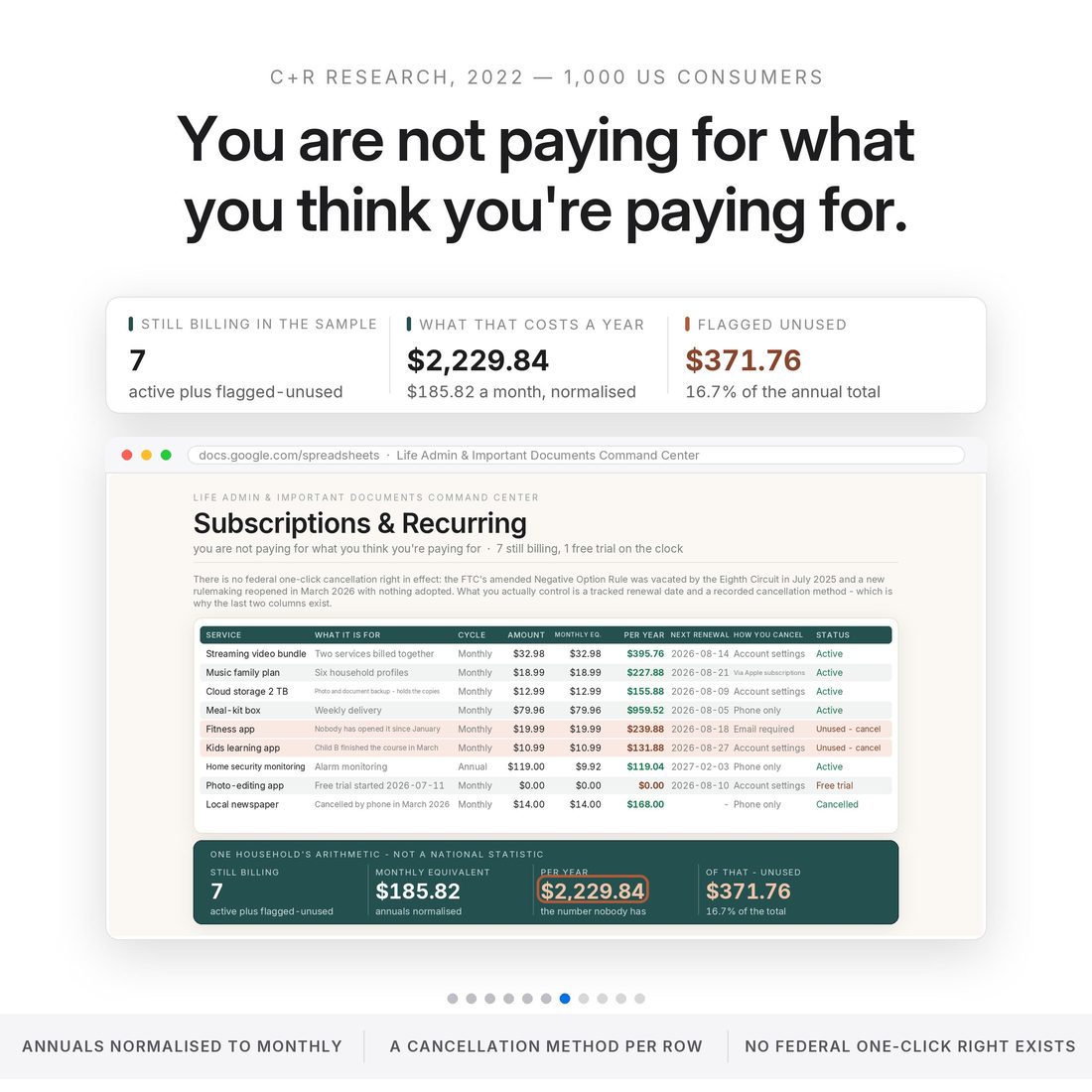
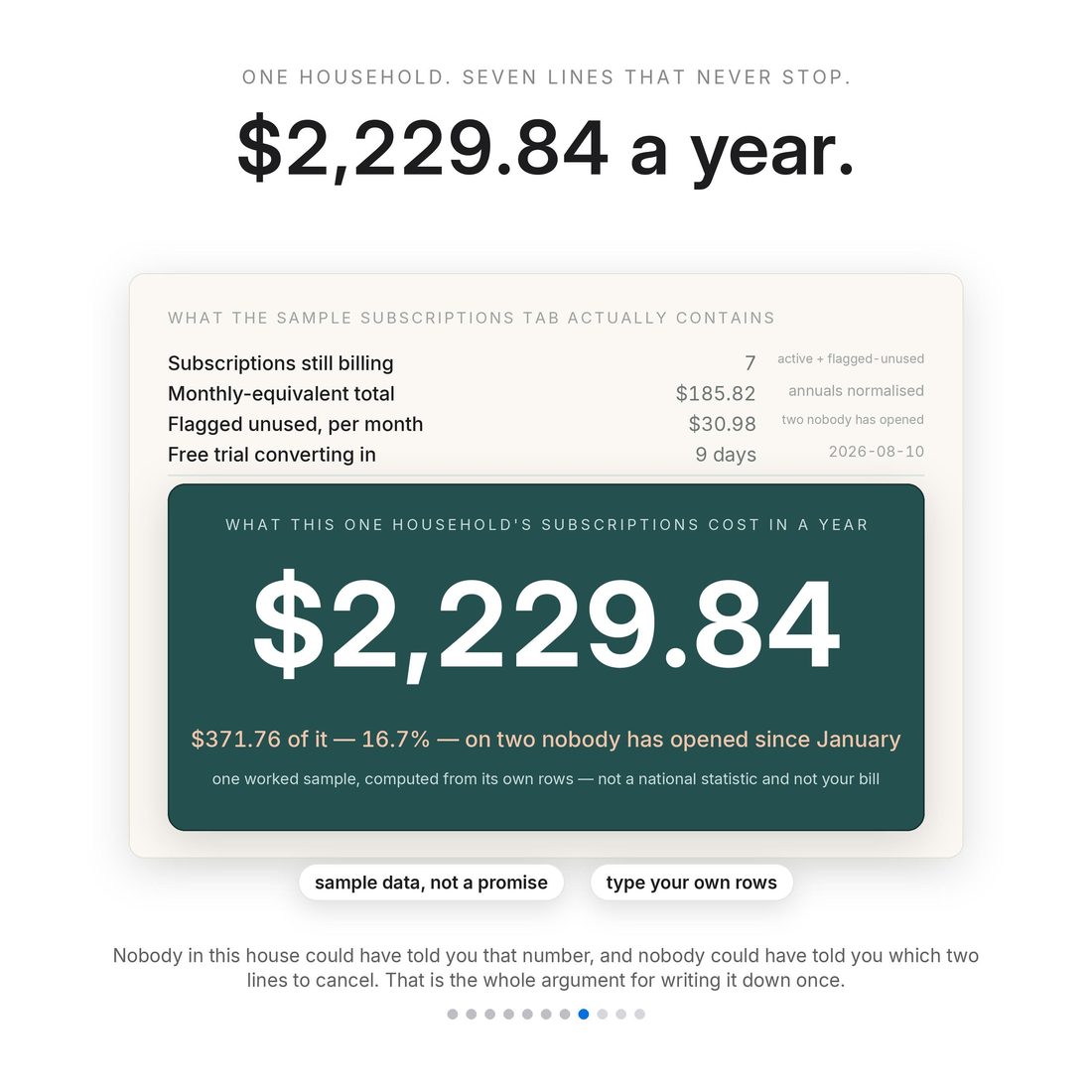
- Subscriptions & Recurring — $2,229.84 a year across 7 subscriptions in the sample, $371.76 of it on two services nobody has opened since January
- If Something Happens — a one-page hand-off assembled from your own call order, to print and put in the fire safe
Overview
The documents aren't lost. The map is.
You already own the passport, the policy, the deed and the beneficiary form. What you probably do not own is one index of where each of them lives, when it expires, and who else could find it. That is why the failure is never that the household did not have it — it is that nobody could find it, and nobody knew it had lapsed. This is that index: twenty connected tabs, one row per document, and a countdown that does the remembering for you. In the shipped sample the Bennetts index 48 documents in one Sunday morning, and the file immediately names one that has already expired, two more inside the 90-day window with the next 45 days out, three documents with no recorded location at all, a beneficiary designation last reviewed 85 months ago, and $2,229.84 a year still billing across 7 subscriptions. The overall completeness score is 71.9%, which is not a failure. It is a to-do list.
It stores no passwords. Not one. No password field, no PIN field, no 2FA field, no full account or card numbers, no Social Security numbers, no passport numbers, no licence numbers — that is a design decision rather than an oversight. What it records instead is the institution, the account nickname, the last four digits only, and one column that does the real work: where the credential lives. Those are facts about your house, not secrets about your money, which is exactly what makes the file safe to keep in Google Drive, safe to print, and safe to hand to somebody.
What's Included
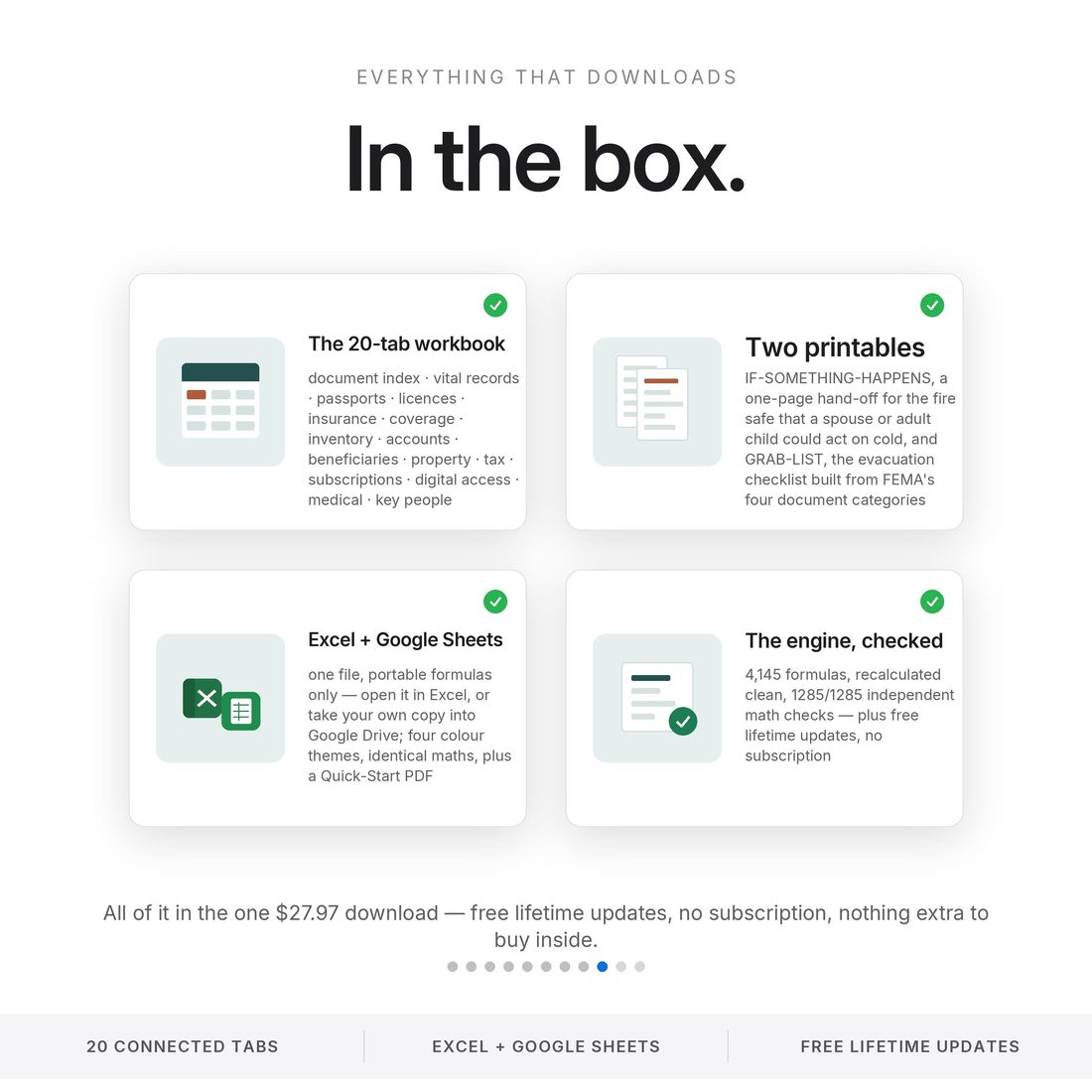
20 connected tabs:
- Four full themes — Editorial, Colorful, Light and Dark (.xlsx), the same complete engine in each
- Quick-Start-Guide.pdf — start to finish in minutes
- ACCESS-YOUR-TEMPLATE.pdf — one click opens your own copy in Google Sheets
- README and LICENSE — delivered as one ZIP, instant download
Key Benefits
Why this one
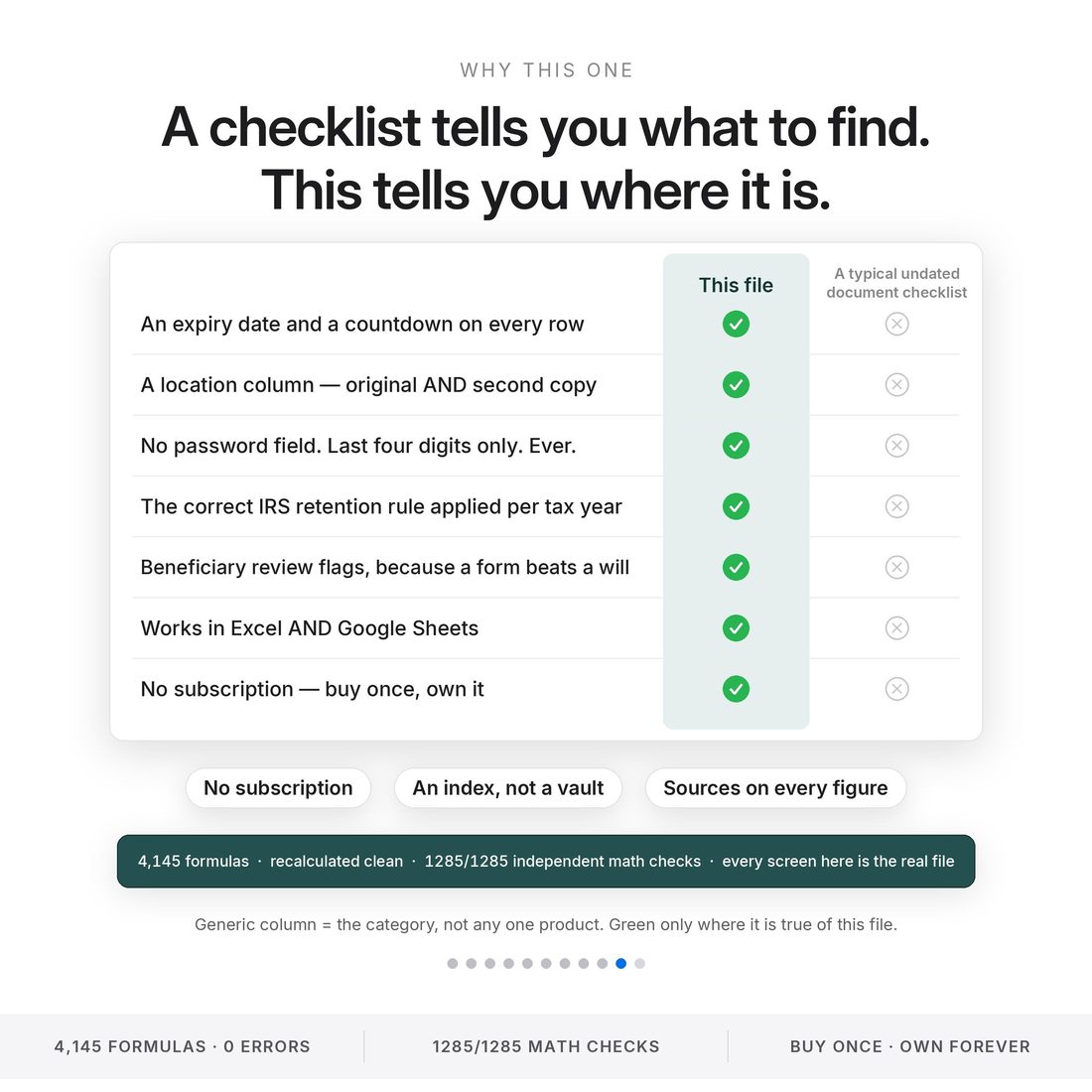
Most of this category is an undated printable list: it tells you what to find, and then it is a piece of paper. Every row here has an expiry date and a real countdown against today. The sample's next one is 45 days out.
Every document has a location column and a second-copy column, and a blank one is flagged rather than left looking finished. Three documents in the sample have no recorded location, which for practical purposes is the same as not having them.
Last four digits only, and one column for where the credential lives — which safe, which box, which password manager, which trusted person already holds the access key.
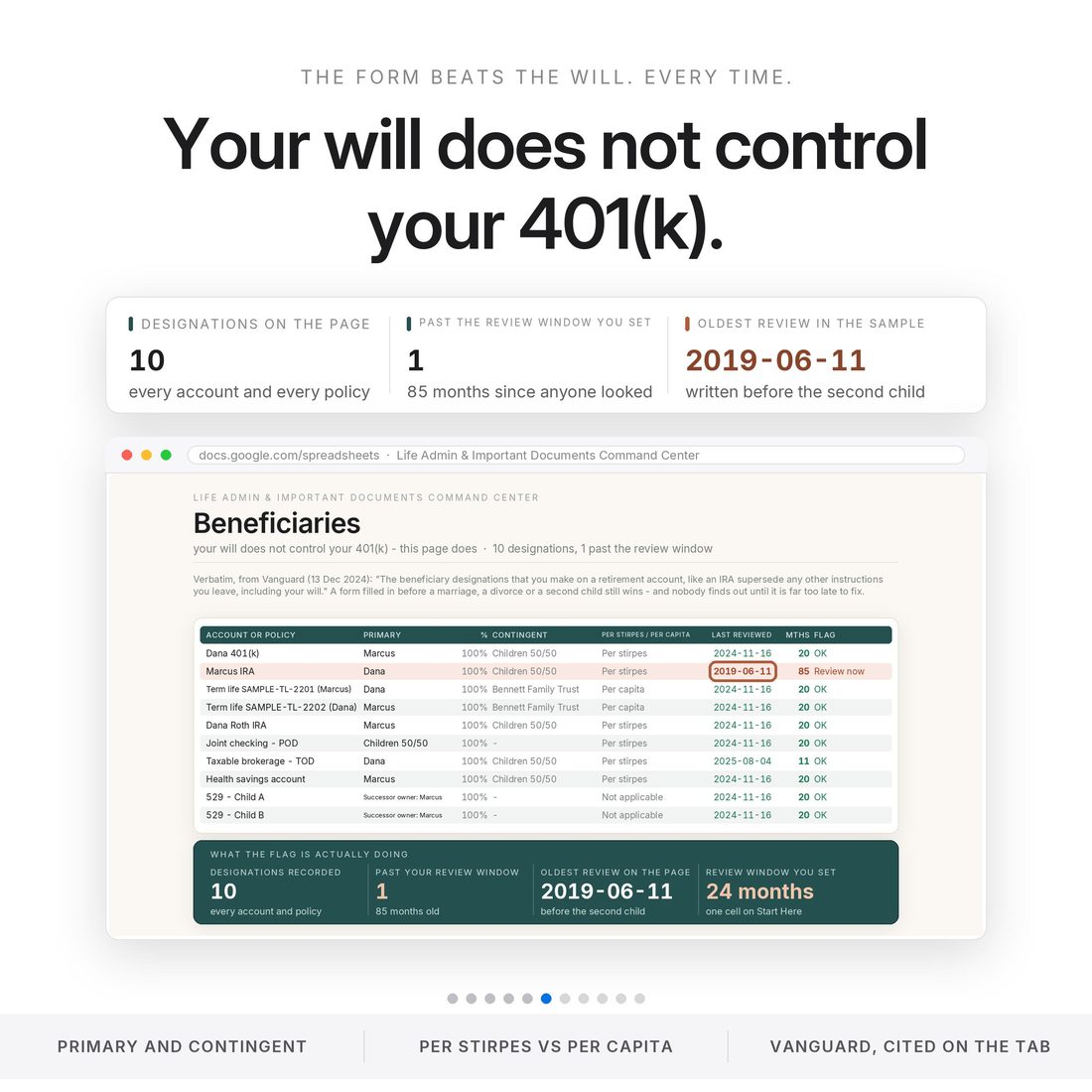
The Beneficiaries tab carries primary, contingent, per stirpes or per capita, and flags the designation that has gone quietly out of date. The sample's was last reviewed 85 months ago.
$2,229.84 a year across seven, with $371.76 of it — 16.7% — on two services nobody has opened since January, each with its cancellation method beside it.
4,145 formulas · recalculated clean in all four themes · 1285 of 1285 independent math checks. Every screen in these images is a render of the real recalculated file, not a mock-up.
Who It's For
Built for
- Anyone who has just bought a house, had a child or changed jobs
- Anyone who has watched a relative try to find a document under pressure
- Anyone who has been meaning to get organised for three years and needs the job broken into rows
- Anyone who wants a spouse or an adult child to be able to pick this up cold
How It Works
Up and running in minutes
The ACCESS-YOUR-TEMPLATE.pdf in your download opens your own copy in Google Sheets with one click
Your state, your county, your driver-licence renewal cycle, where the fire safe is, which password manager you use, and how many days' warning you want. Every other tab reads those by name
Open the Document Index and enter one row per document: owner, both locations, dates. The countdown starts itself
The Dashboard names the next expiry and the days remaining, what has no recorded location, what is stale, and the overall completeness score
IF-SOMETHING-HAPPENS.pdf and the FEMA-based GRAB-LIST go in the fire safe, and the Review Calendar hangs the next check on a moment you already notice
Why It's Different
Not another template
The failure is almost never that a household did not own the document. It is that nobody could find it, and nobody knew it had lapsed. A printable checklist tells you what to find and then becomes a piece of paper. This tells you where it is, where the second copy is, when it expires, who else could reach it, and it counts the days.
Delivery & Compatibility
Instant, and works with what you use
As soon as your order is complete you get instant access to download your files. Prefer Google Sheets for real-time updates and dropdowns? It's fully optimized. More comfortable in Excel? It works just as well.
Built and tested in the latest Excel (Office 365). On Mac we recommend the Google Sheets version — the template is not compatible with Apple Numbers. Available in English. The template ships with sample data so every screen works on open; clear it whenever you're ready. The images and video show that sample data to demonstrate how it looks in use.
FAQ
Questions, answered
Does it work in Google Sheets?
Yes — one click. The ACCESS-YOUR-TEMPLATE.pdf in your download opens a copy straight into Google Sheets. The .xlsx works in Excel too. No macros, no add-ons, no subscription, nothing that reaches the internet.
Does it store passwords or account numbers?
No. There is no password, PIN or 2FA field anywhere in the workbook, and no full account, card, Social Security, passport or licence numbers. It records the last four digits and where the credential lives — which is why it is safe to keep in Drive, safe to print, and safe to hand to somebody.
How long does setup take?
Step one is twelve cells: your state, your county, your driver-licence cycle, where the fire safe is, which password manager you use, and how many days' warning you want. Then walk the house once with the Document Index open.
Why does it not print one national number for licence renewals or record fees?
Because they vary. Driver-licence cycles run from 2 to 12 years, inspection and emissions rules differ county by county, and vital-record fees are set state by state. The file prints the range, cites the source, and asks you to enter your own.
Is anything pre-loaded?
Yes — the Bennetts, a written household rather than a customer, ship inside with 48 documents indexed and room for two hundred, so every countdown, flag and score works the moment you open it. Their rows type over in one pass.
Can I get a refund on a digital download?
Because delivery is instant, all sales are final — but message us with any issue and we'll make it right.
This is a filing index and a countdown. It is not legal, tax, insurance or medical advice, and it is not an estate-settlement tool — it stops at where everything is. It does not tell you that you have a federal one-click right to cancel a subscription, because no such rule is in effect: the FTC's amended Negative Option Rule was vacated in July 2025 and the new rulemaking has adopted nothing. All figures shown are from the Bennetts, a fictional household whose account digits and policy numbers are invented, and are computed by the file itself. Retention periods are attributed to the IRS, coverage definitions to the NAIC and the standard ISO HO-3 special-limits table, and the review triggers and grab list to FEMA; every outside figure carries its publication date and the date it was checked. For personal use only. © 2026 NicheToolkitHub — no resale or redistribution.